Dualite isn’t released yet. It’s the kind of project that lives in that limbo state where the UI is already judging you, the DSP is already doing crimes, and you’re still renaming variables because the architecture keeps getting better.
The elevator pitch is simple:
- Take a stereo signal.
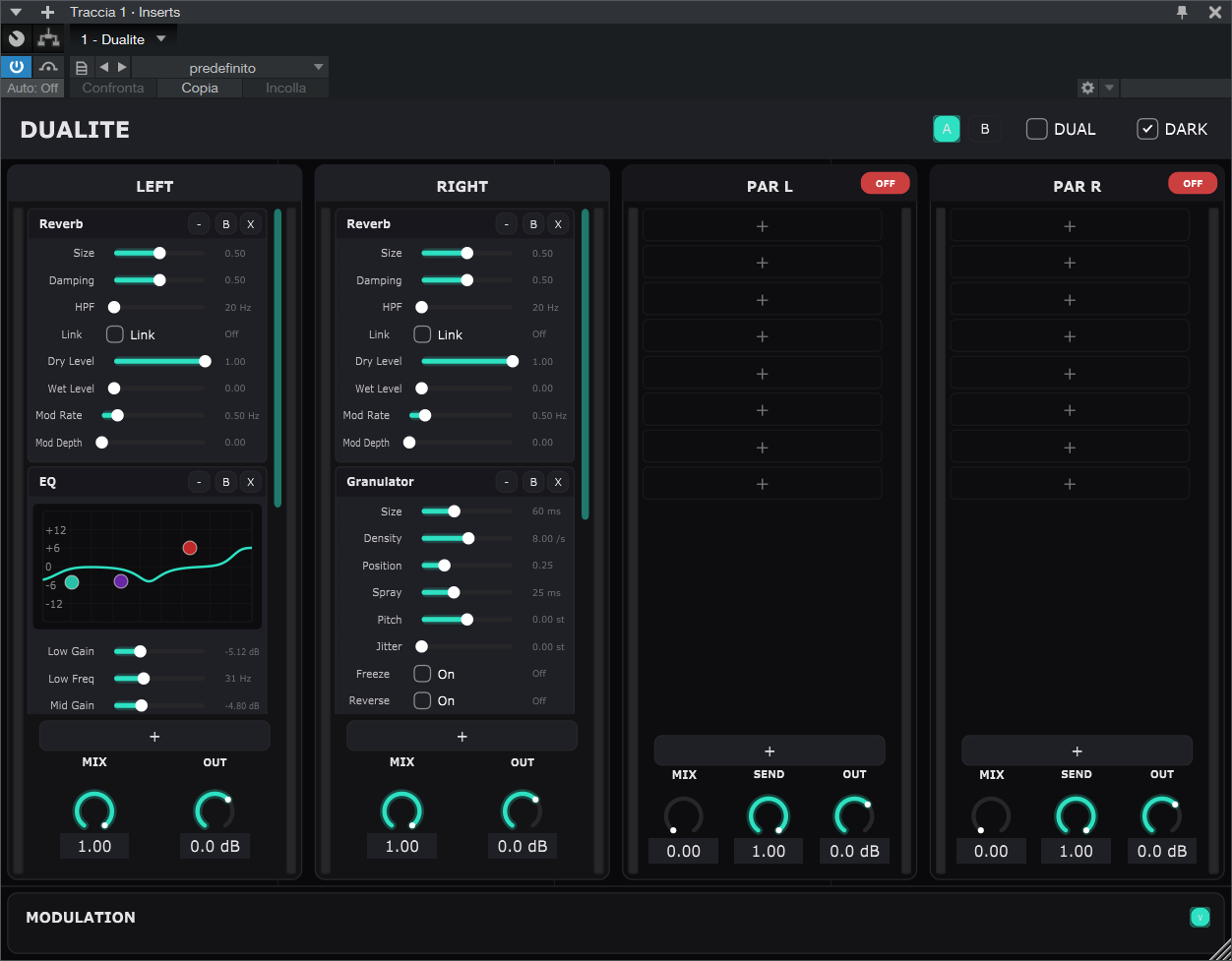
- Treat Left and Right as two separate worlds.
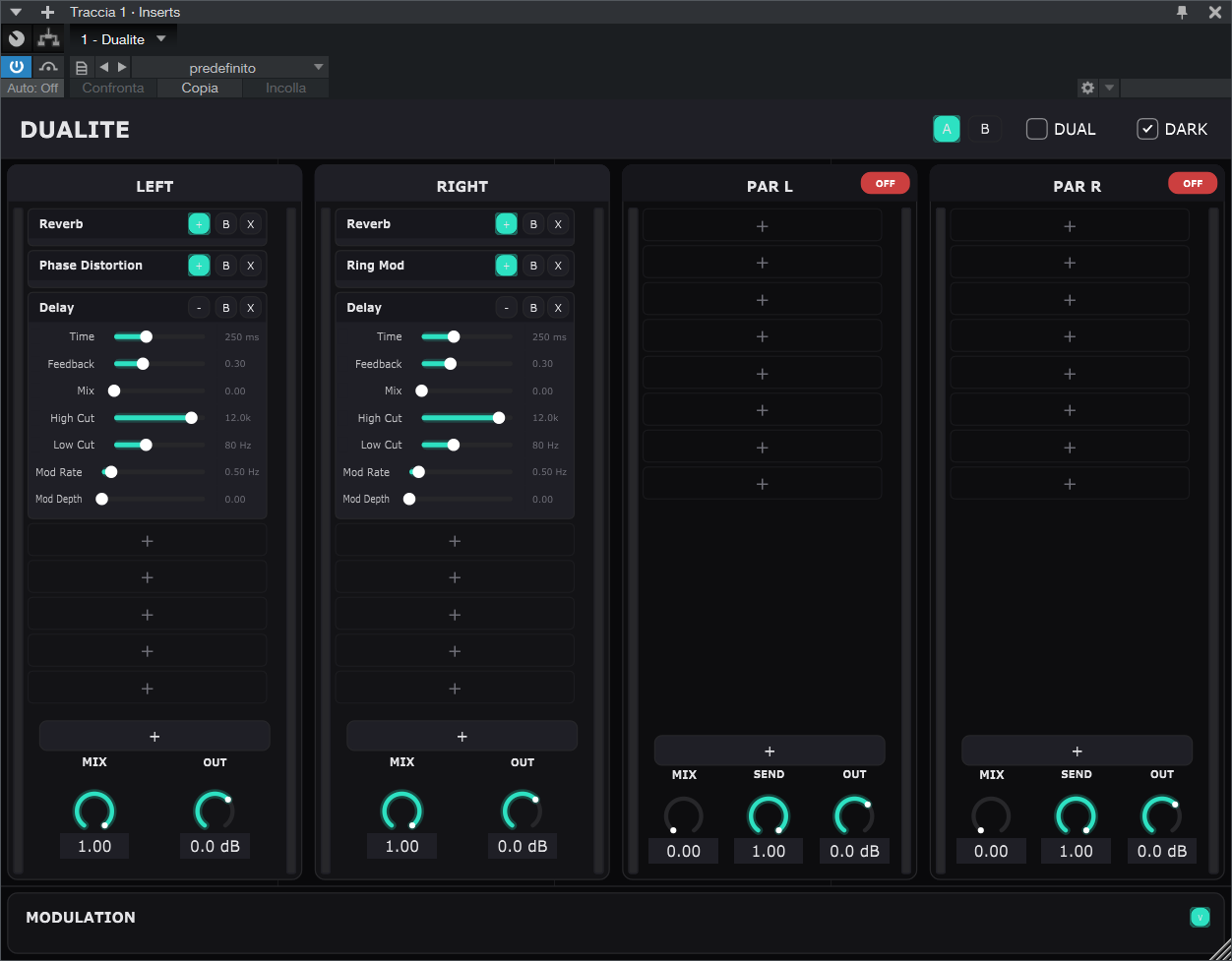
- Give each world a drag-and-drop FX chain.
- Add two auxiliary lanes for parallel processing.
- If “dual-mono” isn’t the right mental model, flip the whole thing into Mid/Side.
In other words: it’s a modular multi-FX, but it’s unapologetically stereo-aware.
🔗The core idea: stereo as two independent decisions
Most “stereo” processing tools secretly want you to behave.
They assume:
- You’ll process both channels together.
- You’ll keep the image coherent.
- You won’t do anything weird to the right channel while the left channel is trying to be a respectable adult.
Dualite is for the days you want to do something weird — intentionally.
The backend is built around four mono processing lanes:
- Main Left
- Main Right
- Parallel Left (aux)
- Parallel Right (aux)
Each lane has its own:
- An
EffectsChain(up to 8 modules) - A lane mix control (dry/wet)
- An output gain
The parallel lanes also have:
- A send amount (how much signal you tap into the aux lane)
- An enable toggle (so they can disappear without changing your routing)
🔗Architecture snapshot (signal flow, but compact)
Input (stereo) -> split/encode -> four mono lanes (Main L/R + Aux L/R) -> per-lane FX chains -> per-lane mix + per-lane output gain -> latency alignment -> sum parallel lanes back into the mains -> decode (if M/S) -> output (stereo).
That’s the whole plugin, conceptually.
The interesting part is that the flow stays the same in both modes — the meaning of each lane changes.
🔗Dual vs Mid/Side: one toggle, two mental models
Dualite has a parameter called auxPairMode (exposed as a toggle in the editor).
- In Dual mode, the main lanes process L and R directly, and the parallel lanes tap L into Par L and R into Par R.
- In Mid/Side mode, the input is encoded to Mid and Side first; the main lanes become Mid/Side processors, and the parallel lanes become Par Mid / Par Side.
The implementation is intentionally blunt (in the good way):
- It encodes once at the input.
- Processes everything as mono lanes.
- Sums parallel lanes in-domain.
- Decodes once at the output.
It’s not “secret Mid/Side happening in the background.” It’s explicit, audible, and predictable.
🔗The FX engine: EffectsChain as a little modular runtime
The DSP core is a dynamic chain:
- An
EffectsChainowns a vector ofEffectBaseinstances. - It can add/remove/move/swap modules at runtime.
- Each module exposes a list of
EffectParameterdescriptors.
There are two small design choices here that end up shaping the entire feel of the plugin:
- Effect state is serializable. Each module can serialize its bypass state + parameters, and the chain serializes as a
;-separated list. - The chain is tappable. It can call back before/after the lane and before/after each effect, which becomes the backbone for envelope-follower modulation.
The UI side mirrors this: each lane is a column, each slot is draggable, and modules can be collapsed so the plugin stays usable even when you’ve built a small city inside it.
🔗Effects (some highlights)
Dualite started with the “classic multi-FX starter pack,” and then escalated.
The repo currently contains modules like:
- Chorus / Flanger / Phaser
- Frequency shifter, ring mod
- Reverb + Convolver reverb
- Delay (with cubic interpolation so time changes can be smooth)
- Granulator (a tiny grain engine with freeze/reverse)
- Compressor, limiter, clipper
- Saturation (with a WDF diode circuit)
- EQ + filter
- Analyzer + noise generator
A few details I like:
- The saturation effect uses
chowdsp_wdfto model diode behaviors, with optional oversampling and reported latency. - The reverb and delay both contain subtle internal modulation (block-rate movement). It’s not meant to be a chorus; it’s meant to keep the tail from feeling like a static screenshot.
- The delay keeps modulation cheap and stable: smoothed parameters, feedback filtering, and a soft clip in the feedback loop to prevent runaway chaos.
🔗Modulation: four slots, two personalities
Dualite has a modulation matrix with four mod slots.
Each slot can be:
- An LFO (sine/triangle/saw/square/random)
- A drawn LFO (literally: a small table you can paint)
- A wavetable-ish LFO (with banks like Harmonics/Warp/Steps/Bend)
- An envelope follower
The modulation matrix computes current values, caches modulation per target, and the processor applies it to effects every audio block.
One intentionally opinionated constraint:
- One modulation source per target parameter.
If you assign MOD 2 to a parameter that was already driven by MOD 1, MOD 2 wins. It’s not because I hate fun; it’s because I like routings that remain decipherable at 2 a.m.
🔗Assigning modulation: right-click, pick a driver
In the UI, parameter value labels can be right-clicked to assign modulation.
Under the hood, that right-click creates/updates a ModulationConnection:
- Which mod slot
- Which lane
- Which effect index
- Which parameter id
- Amount and bipolar/unipolar mode
Then the look-and-feel draws a little “modulation arc” on the knob/slider, colour-coded per MOD slot.
🔗Envelope followers that can tap anywhere
Envelope followers are treated as first-class modulation sources.
The clever bit isn’t the follower itself (it’s a simple attack/release smoother), it’s the routing:
- Each env follower can tap lane pre/post.
- Or it can tap effect N pre/post.
That’s powered by the EffectsChainTapListener callbacks. The processor listens to taps, checks whether any env slot is currently pointing at that tap, and updates an atomic “pending env value” that the modulation matrix picks up.
So you can build things like:
- “Envelope-follow the output of the saturator on the left lane, but use it to modulate the delay time on the right parallel lane.”
Which is exactly the sort of sentence Dualite exists to make possible.
🔗Latency: parallel lanes without the phase betrayal
Parallel processing is great until one lane adds oversampling latency and your mix quietly turns into comb filtering.
Dualite does a pragmatic thing:
- Each effect reports its own latency.
- Lane latency is the sum of its modules.
- The processor finds the maximum lane latency.
- It then applies delays so all lanes line up before summing.
It’s not glamorous, but it’s the difference between “parallel” and “parallel-ish.”
🔗Snapshots A/B: because curiosity needs undo
There are A/B snapshot buttons.
They capture the full state:
- APVTS parameters
- Effect chains (serialized)
- Modulation connections
- LFO draw tables
- Envelope follower tap points and times
- UI theme state
Recall is done by swapping state while processing is suspended, then nudging the UI to refresh its slots.
🔗The UI: modern dark, but trying to stay readable
This is a JUCE UI, but it’s aiming for something closer to a modern “instrument panel”:
- A custom
LookAndFeel_V4palette - Lane strips that can stay narrow without becoming unusable
- Collapsible modules
- Tooltips everywhere
There’s also a small but important touch: modulation feedback is visible where it matters (on the control itself), instead of hiding in a separate routing window.
🔗Where it’s going next
Dualite is still in active development, so the roadmap is less “marketing bullet points” and more “things I want before I trust it in a real session”:
- Making Mid/Side feel even more explicit (and possibly per-lane)
- More musical modulation defaults (especially for time-based FX)
- More clarity around modulation routing and slot engagement
- The usual suspects: stability, performance, and fewer ways to accidentally create a sonic black hole
When it’s ready, I’ll write the release post.
For now: it’s my stereo playground — a plugin for when Left and Right deserve separate opinions.